
Elephant Robotics Mercury Humanoid Robot A1 (4011300001)
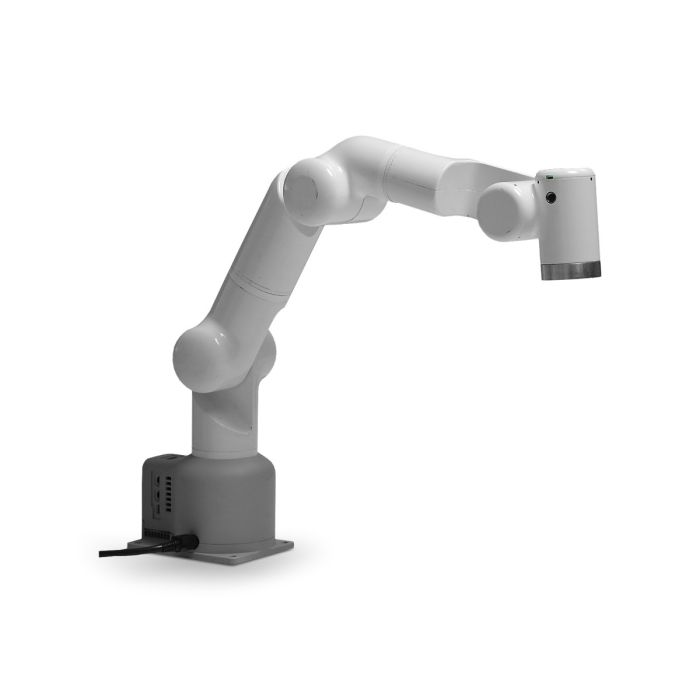
In stock
- BRAND:
- ELEPHANT ROBOTICS
- PART #:
- 4011300001
- ORIGIN:
- China
- AVAILABILITY:
- SUBJECT TO AVAILABILITY
- SKU:
- Elephant-Robotics-4011300001
Elephant Robotics Mercury Humanoid Robot A1 (4011300001)
Most people picture a humanoid robot as a whole body, yet the part that does the useful work is often the arm. The Elephant Robotics Mercury Humanoid Robot A1 (4011300001) is that part, built as a seven-degree-of-freedom unit with carbon fiber, aluminum alloy and harmonic reducers. It suits a lab bench, a classroom or a demonstration stand, where a reach of 450mm matters more than brute strength.
The product is available through this page, by quotation.
Background
Elephant Robotics and the Mercury series
Elephant Robotics builds compact robots for education, research and light automation, and the Mercury series is its line for humanoid and mobile-manipulation work. The series comes in three versions: Mercury A1, Mercury B1 and Mercury X1. This page covers the A1 only. If you are comparing the whole family, the Mercury Humanoid Robot B1 (4011300002) and the Mercury X1 Wheeled Humanoid Robot (4011300003) each have their own pages.
The Mercury series supports the major programming languages and popular simulation platforms, including ROS, Moveit, Gazebo and Mujoco. For a team that already works in these tools, that means the arm can be brought into an existing workflow instead of forcing a new one.
Positioning and key technology of the A1
The A1 has an integrated design with a maximum arm span of 450 millimeters and a maximum load of 1 kilogram. Its materials are carbon fiber, aluminum alloy and engineering plastics. Each joint uses a harmonic reducer and an electromagnetic friction plate brake. The joint modules reach a maximum output torque of 80Nm, with a 19bit encoder resolution and a repetitive positioning accuracy of 0.6 arc minutes.
The A1 also carries a myPanel interface that allows quick teach programming. The body is equipped with two screens and supports M5 ecological applications, which widens what the arm can be paired with. Kinematics self-interference detection helps avoid motion collisions, a useful safeguard when students or new operators are driving the arm.
Technical Specifications
| Specification | Mercury A1 |
|---|---|
| Product size | 98*128*640mm |
| Working voltage | DC24V/9.2A |
| Degree of freedom | 7DOF |
| Maximum working radius | 450mm |
| Maximum payload | 1KG |
| Repeatability | ±0.05mm |
| Material | Carbon fiber, Aluminum alloy, Engineering plastics |
| Reduction mechanism | Harmonic Reducer |
| Joint brake | Electromagnetic friction plate |
| Main controller CPU | Quad-core ARM Cortex-A72 ARMv8 64Bit [email protected] |
| IO | 24V 6 Input, 6 Output |
| Communication | CAN Bus/WIFI/Network port/Bluetooth/USB serial port |
| Joint module maximum output torque | 80Nm |
| Joint module encoder resolution | 19bit |
| Joint module repetitive positioning accuracy | 0.6 arc minutes |
Specifications as published by the manufacturer; confirmed against the datasheet at quotation.
The manufacturer has not published the IP rating, the maximum joint speed, the power consumption, the operating temperature, the package contents or the noise level; they are confirmed at quotation.
What makes the Mercury A1 different from a typical desktop arm?
The first difference is the seven axes. Most small desktop arms stop at six. A seventh degree of freedom gives the arm more ways to reach a point, which is why it is described as humanlike in its reach and orientation. For research on embodied AI or on motion planning, that extra freedom is a real subject of study and not a footnote.
The second difference is the joint hardware. Harmonic reducers, electromagnetic friction plate brakes and 19bit encoders are normally found in more expensive equipment. Together they give the repeatability of ±0.05mm, which suits teaching and prototyping where results have to repeat from one run to the next.
The third difference is the software side. The A1 supports ROS and moveIt, and the series works with Gazebo and Mujoco simulation. A team can plan and test a motion in simulation first, then run it on the arm. For a beginner, the myPanel interface offers quick teach programming instead, so the arm can be taught by demonstration without writing code first.
How does the Mercury A1 fit into the wider Mercury family?
The Mercury series has the A1, B1 and X1 as versions. This article gives only A1 figures, and no figure here should be read as belonging to the B1 or the X1. The A1 is the version this page documents: a 7DOF unit with a 1KG maximum payload and a 450mm working radius.
If your project calls for a wheeled platform, look at the X1 page. If you want to compare against the B1, its page is the place to start. If you are still deciding between a single arm and a full humanoid form, the Humanoids and Bipedal Humanoids categories show the wider range. We can also compare versions with you when you request a quotation.
Who is the Mercury A1 for?
Universities and research labs are the clearest fit. They gain a seven-axis platform that works with ROS, moveIt, Gazebo and Mujoco, so existing code and simulation setups carry over. The 6 inputs and 6 outputs at 24V, plus CAN Bus, WIFI, a network port, Bluetooth and a USB serial port, make it practical to connect sensors and other equipment.
Schools and training centers can use it to teach kinematics, programming and robotics fundamentals. The quick teach interface lowers the barrier for new learners, and the self-interference detection protects the arm during early experiments.
Exhibition and display teams can use it for functional demonstrations, since the arm works with multiple types of end effectors. Integrators and developers building prototypes will value the open software support and the two screens with M5 ecological applications.
The A1 is not meant for heavy loads. Its maximum payload is 1KG. If your task needs a larger lift, ask us about other options before you commit. For a wheeled or a different Mercury form, see the Mercury X1 or the Mercury B1 pages named above.
What is the Mercury A1 used for?
- Scientific research. A seven-axis arm with ROS and moveIt support for motion planning and embodied-AI experiments.
- Classroom teaching. Students learn kinematics and programming on hardware that behaves the same way each time.
- Functional displays. The arm works with multiple types of end effectors, so it can show a task live at an exhibition.
- Simulation to hardware. Plan a motion in Gazebo or Mujoco, then run it on the real arm.
- Teach programming. The myPanel interface allows quick teach programming without a full code setup.
- Prototype integration. The IO and communication ports let developers connect sensors, controllers and other equipment.
Pricing and Availability
We do not list prices on this page. Quotation is the way to buy: send us your requirements and we prepare an offer for the Elephant Robotics Mercury Humanoid Robot A1 (4011300001). Delivery, customs and support are arranged with the quotation. The Mercury A1 is available on this page.
Frequently Asked Questions
How many degrees of freedom does the Mercury A1 have?
It has 7DOF, which is seven independently moving joints. The seventh gives the arm extra flexibility in reaching a point.
What payload and reach can I expect?
The maximum payload is 1KG and the maximum working radius is 450mm.
How precise is the arm?
Repeatability is ±0.05mm. The joint modules have a 19bit encoder resolution and a repetitive positioning accuracy of 0.6 arc minutes.
Which software does it support?
It supports ROS and moveIt, and the Mercury series works with Gazebo and Mujoco. The myPanel interface allows quick teach programming.
What power and connections does it need?
The working voltage is DC24V/9.2A. Connections are CAN Bus, WIFI, a network port, Bluetooth and a USB serial port, with 24V 6 Input and 6 Output IO.
Can the Mercury A1 work with different end effectors?
Yes. It can work with multiple types of end effectors to suit scientific research, education and functional displays.
Where can I buy the Mercury A1 and what does it cost?
You can buy it through this page by requesting a quotation. We give no price here; the offer is prepared once we know your requirements.
Summary
The Mercury A1 takes the working heart of a humanoid and offers it as a single seven-axis arm: precise at ±0.05mm, open to ROS and moveIt, and made for research, teaching and display work. It is light on payload at 1KG and honest about its purpose. If that matches your project, this page is the starting point.