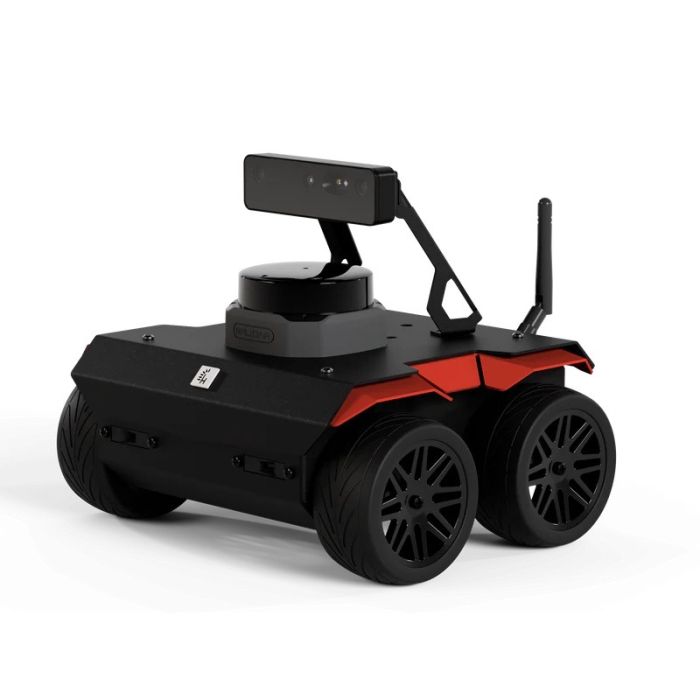
Husarion ROSbot 3 UGV
In stock
- BRAND:
- HUSARION
- MODEL:
- ROSbot 3
- ORIGIN:
- Poland
- Warranty:
- 12 MONTHS
- AVAILABILITY:
- SUBJECT TO AVAILABILITY
- SKU:
- Husarion-ROSbot-3
Husarion ROSbot 3 UGV
Most robotics projects lose their first months not to bad ideas but to wiring, mounting and driver hunting. The Husarion ROSbot 3 UGV is built to remove that delay: an indoor mobile robot platform, purpose-built for research and education, that arrives with its computer, sensors and software already working together.
The product is available through this page, by quotation.
Background
Husarion and the ROSbot line
Husarion is a robotics company whose mobile platforms are made for developers who work with ROS. The ROSbot name belongs to its compact indoor line, the one a laboratory or a classroom puts on a table and a floor to test navigation ideas quickly. Husarion also makes larger machines for other jobs, such as the Husarion ROSbot XL UGV, the Husarion Lynx UGV and the Husarion Panther Industrial Grade Indoor / Outdoor UGV (PTH12). Together they cover a range from desktop research to heavier duty work.
The ROSbot 3 generation comes in two versions: ROSbot 3 and ROSbot 3 PRO. Both share the same computer, chassis, drive and sensor layout. The difference lies in the perception hardware, which the sections below explain.
Positioning and key technology
The ROSbot 3 is aimed at teams who want to work on autonomy software rather than on a mobile base. At its center is a Raspberry Pi 5 with 8GB RAM and a VideoCore VII GPU, running Ubuntu 24.04 with ROS 2 Jazzy preinstalled. A built-in STM32F407 microcontroller handles the low-level side of the robot, and the Raspberry Pi 5 handles the high-level software.
Perception is built in. A Luxonis OAK-D Lite 3D camera and an RPLIDAR C1 360 degree LiDAR come with the ROSbot 3, while the PRO version carries the OAK-D Pro and the RPLIDAR S2. A BNO055 9-axis absolute orientation sensor, four VL53L0X Time-of-Flight distance sensors and four magnetic encoders complete the sensing package.
Technical Specifications
| Specification | ROSbot 3 | ROSbot 3 PRO |
|---|---|---|
| Dimensions with camera and LiDAR (L x W x H) | 200 x 233 x 197 mm / 7.9 x 9.2 x 7.7 in | 200 x 233 x 197 mm / 7.9 x 9.2 x 7.7 in |
| Dimensions without camera and LiDAR (L x W x H) | 200 x 233 x 103 mm / 7.9 x 9.2 x 4.0 in | 200 x 233 x 103 mm / 7.9 x 9.2 x 4.0 in |
| Weight | 2,84 kg / 100 oz (with camera and LiDAR), 2,45 kg / 86 oz (without camera and LiDAR) | 2,84 kg / 100 oz (with camera and LiDAR), 2,45 kg / 86 oz (without camera and LiDAR) |
| Standard wheel diameter / Clearance / Wheelbase | 84 mm / 23 mm / 106 mm | 84 mm / 23 mm / 106 mm |
| Chassis material | Powder-coated aluminum plate, 1.5 mm thick | Powder-coated aluminum plate, 1.5 mm thick |
| Maximum translational velocity | 1.0 m/s | 1.0 m/s |
| Maximum rotational velocity | 420 deg/s (7.33 rad/s) | 420 deg/s (7.33 rad/s) |
| Maximum load capacity | Up to 5 kg / 176 oz *not in continuous work | Up to 5 kg / 176 oz *not in continuous work |
| Battery life | 1.5h - 5h | 1.5h - 5h |
| Batteries | 3 x Li-Ion 18650 protected, rechargeable, 3500mAh, 3.7V nominal | 3 x Li-Ion 18650 protected, rechargeable, 3500mAh, 3.7V nominal |
| Computer | Raspberry Pi 5 (8GB RAM, VideoCore VII GPU) | Raspberry Pi 5 (8GB RAM, VideoCore VII GPU) |
| Storage | 64GB microSD card | 64GB microSD card |
| Networking | 2.4 GHz and 5 GHz 802.11b/g/n/ac wireless LAN | 2.4 GHz and 5 GHz 802.11b/g/n/ac wireless LAN |
| Built-in microcontroller | STM32F407 | STM32F407 |
| 3D camera | Luxonis OAK-D Lite | Luxonis OAK-D Pro |
| LiDAR | RPLIDAR C1, 360 degree | RPLIDAR S2, 360 degree |
| IMU sensor | BNO055, 9-axis absolute orientation | BNO055, 9-axis absolute orientation |
| Infrared distance sensors | 4 x VL53L0X Time-of-Flight, up to 200 cm range | 4 x VL53L0X Time-of-Flight, up to 200 cm range |
| Encoders | 4 x magnetic, 48cpr, 12 poles | 4 x magnetic, 48cpr, 12 poles |
| Rear panel USB ports | 2 x USB 2.0 host ports from SBC | 2 x USB 2.0 host ports from SBC |
| Servo outputs | 6, servo output with PWM | 6, servo output with PWM |
| Operating system | Ubuntu 24.04 with ROS 2 Jazzy preinstalled | Ubuntu 24.04 with ROS 2 Jazzy preinstalled |
Specifications as published by the manufacturer; confirmed against the datasheet at quotation.
The manufacturer has not published the IP rating, the operating temperature range, the camera resolution, the motor power in watts for the robot as a whole or the climbing ability; they are confirmed at quotation.
What makes the ROSbot 3 different from the ROSbot 3 PRO?
On the published figures, the two versions are the same machine in almost every respect. They share the dimensions, the weight figures, the chassis, the speeds, the batteries, the Raspberry Pi 5 computer and the full set of onboard sensors. The difference is limited to the two main perception devices.
The ROSbot 3 carries a Luxonis OAK-D Lite camera and an RPLIDAR C1. The Husarion ROSbot 3 PRO UGV carries a Luxonis OAK-D Pro camera and an RPLIDAR S2. Both LiDAR units are 360 degree devices. The source does not publish further comparisons between them, such as range or resolution, so this page makes none. If your work depends on the finer differences between these sensors, ask for them when you request a quotation.
What does the ROSbot 3 offer a team that builds its own base?
A homemade base can work, but it brings a long list of small jobs: choosing motors, fitting encoders, writing a microcontroller bridge, mounting a LiDAR, calibrating an orientation sensor and installing a matching operating system. The ROSbot 3 ships with these pieces already chosen and connected. It has four magnetic encoders at 48cpr, a BNO055 absolute orientation sensor and an STM32F407 microcontroller in the same chassis as the computer.
The machine also leaves room to grow. Two USB 2.0 host ports on the rear panel and six PWM servo outputs allow added devices, and the load capacity is up to 5 kg, though not in continuous work. A team can therefore attach a small arm or an extra sensor without redesigning the platform.
Who is the Husarion ROSbot 3 UGV for?
University laboratories are the clearest fit. Students can start with a robot that already runs Ubuntu 24.04 and ROS 2 Jazzy, so the first session goes to mapping and navigation rather than installation. Because the robot is compact, several can share a single room.
Schools and training centers benefit from the gamepad option. You can control the ROSbot without coding by using a Logitech F710 gamepad, which is not included in the standard set. That lets younger or newer learners drive the robot before they write any software.
Research groups and prototyping teams use the platform as a testbed for SLAM, sensor fusion and navigation work. Those who want the higher-grade perception hardware should look at the ROSbot 3 PRO, which carries the OAK-D Pro and the RPLIDAR S2. Buyers who need a larger platform may browse the full UGVs category.
What is the Husarion ROSbot 3 UGV used for?
- Teaching ROS 2. A ready robot with ROS 2 Jazzy preinstalled lets a class begin with real hardware on day one.
- Indoor mapping and SLAM. The 360 degree LiDAR, the depth camera and the orientation sensor give a mapping algorithm the data it needs.
- Navigation experiments. Encoders, distance sensors and a 1.0 m/s top speed support tests of path planning and obstacle avoidance in rooms and corridors.
- Sensor fusion research. Camera, LiDAR, IMU and Time-of-Flight data are all on one platform, so combining them takes less setup.
- Light payload prototypes. With up to 5 kg of load capacity, not in continuous work, and six servo outputs, teams can test small manipulators or carried equipment.
- Student projects and demonstrations. A compact robot with gamepad control is easy to show at open days, competitions and workshops.
Pricing and Availability
No price is listed on this page; quotation is the way to buy. Tell us the version you need, the quantity and where the robot will be used, and we will prepare an offer. Delivery, customs and support are arranged with the quotation, so you do not have to coordinate them separately. The Husarion ROSbot 3 UGV is available on this page.
Frequently Asked Questions
Is the ROSbot 3 meant for outdoor use?
The manufacturer describes it as an indoor mobile robot platform, purpose-built for research and education. An IP rating has not been published, so outdoor suitability should not be assumed.
What software does it run?
It runs Ubuntu 24.04 with ROS 2 Jazzy preinstalled. The computer is a Raspberry Pi 5 with 8GB RAM and a 64GB microSD card.
How long does the battery last?
The published battery life is 1.5h - 5h. The robot uses three Li-Ion 18650 protected rechargeable batteries of 3500mAh capacity and 3.7V nominal voltage, and the device may be shipped interchangeably with similar batteries.
How fast can it move and turn?
The maximum translational velocity is 1.0 m/s, and the maximum rotational velocity is 420 deg/s (7.33 rad/s).
Can I drive it without writing code?
Yes, with a Logitech F710 gamepad. The gamepad is not included in the standard set.
What is the difference between the ROSbot 3 and the ROSbot 3 PRO?
The ROSbot 3 has a Luxonis OAK-D Lite camera and an RPLIDAR C1. The ROSbot 3 PRO has an OAK-D Pro camera and an RPLIDAR S2.
Where can I buy the Husarion ROSbot 3 UGV and what does it cost?
You can buy it through this page by requesting a quotation. We do not publish a price here; the offer is prepared after you tell us your version and quantity.
Summary
The slowest part of many robotics projects is the work before the first real experiment. The Husarion ROSbot 3 UGV is designed to shorten that stretch. It combines a Raspberry Pi 5 computer, a 360 degree LiDAR, a 3D camera, an orientation sensor, distance sensors and encoders on an aluminum chassis, with Ubuntu 24.04 and ROS 2 Jazzy ready to go. It suits laboratories, classrooms and prototyping teams who work indoors and want to spend their time on software. To request a quotation, this page is the starting point.