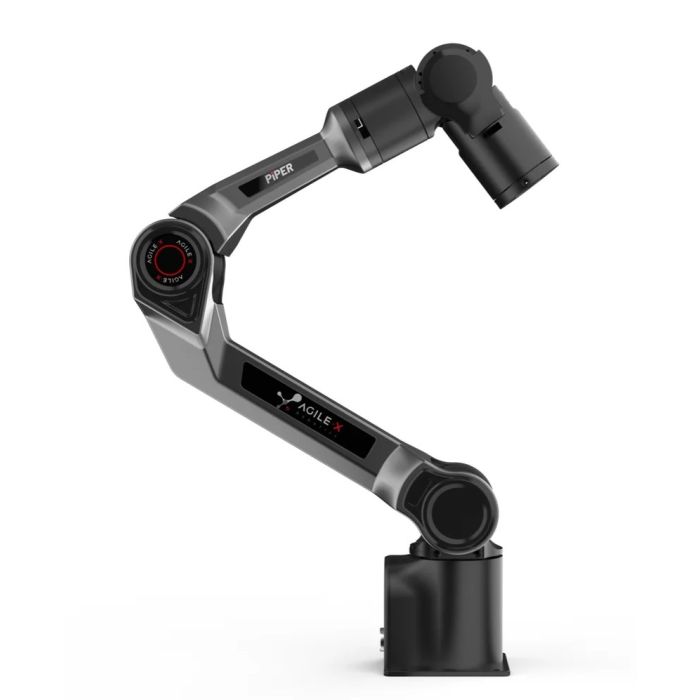
Agilex Piper Lightweight Robotic Arm
In stock
- BRAND:
- AGILEX
- PART #:
- PiPER
- ORIGIN:
- China
- AVAILABILITY:
- SUBJECT TO AVAILABILITY
- SKU:
- AgileX-PiPER
Agilex Piper Lightweight Robotic Arm
A few kilograms of aluminum and polymer, six joints and a handful of lines of Python: that is all it takes to put a working manipulator on a desk. The Agilex Piper Lightweight Robotic Arm (AgileX-PiPER) is built for teams that want real arm motion without turning the project into a construction job, whether the arm sits on a lab bench, a mobile base or a small test cell.
The product is available through this page, by quotation.
Background
AgileX and the road to PiPER
AGILEX is a robotics brand best known to many buyers for mobile platforms and collaborative robot kits. PiPER belongs to the manipulation side of that family. It is an arm designed to be paired with other equipment: a wheeled chassis, a workstation, a vision system or a research rig. If you are comparing it with other equipment from the same maker, the AgileX category shows the wider range, and the Cobots category groups the collaborative arms and kits we quote.
The idea behind PiPER is straightforward. Many universities, labs and small integrators need a six-axis arm that does not demand a heavy pedestal, a separate cabinet or a long commissioning period. A compact arm with its controller built in answers that need, and it keeps the first experiment close to the people running it.
What sets the design apart
PiPER is a lightweight robotic arm with six integrated joint motors for smooth, precise control. The body is aluminum alloy with a polymer shell, which keeps the weight low while the structure stays firm. The controller is integrated, so there is no separate control box to place and wire.
On the software side, the arm is controlled through a Python API and supports both ROS1 and ROS2. That matters in practice: a student can move a joint from a short script on day one, while a research group can plug the arm into an existing ROS stack. A modern tablet-based interface is also provided for building and controlling applications, so not every user has to write code.
Technical Specifications
| Specification | Value |
|---|---|
| Degrees of freedom | 6 |
| Payload | 1.5kg |
| Weight | 4.2kg |
| Reach | 626 mm |
| Repeatability | ± 0.1 mm |
| Input voltage | DC24V |
| Operating temperature | -20℃ to 50℃ |
| Material | Aluminum Alloy Body, Polymer Shell |
| Controller | Integrated |
| Communication | CAN |
| Programming | Drag Teaching / Offline Trajectory / API / PC |
| Software support | Python API; ROS1 and ROS2 |
| User interface | Tablet-based interface |
| External interface | Power*1, CAN*1 |
| Base installation dimensions | 70mm*70mm*M5*4 |
Specifications as published by the manufacturer; confirmed against the datasheet at quotation.
The manufacturer has not published the IP rating, the maximum joint speed, the joint range of motion, the power consumption, the overall dimensions, whether a gripper is included or what is in the box; they are confirmed at quotation.
What makes PiPER different from a larger industrial arm?
The first difference is mass. At 4.2kg, PiPER can be lifted, repositioned and mounted on a surface with a simple four-bolt pattern: the base installation dimensions are 70mm*70mm*M5*4. A large industrial arm needs a dedicated foundation and a separate cabinet. PiPER is meant to be moved to wherever the experiment is.
The second difference is the way it is taught. Programming options include drag teaching, offline trajectory, API and PC control. Drag teaching lets an operator guide the arm by hand and record the motion, which is a friendly way for newcomers to build a first routine. The API and ROS routes then give developers a way to scale up from there.
The trade-off is plain. PiPER carries a 1.5kg payload, so it suits light tools, sensors, small grippers and lightweight parts. It is not a machine for heavy handling, and we would rather say so now than at the delivery dock.
What do the Basic, Gripper and Pendant versions mean for a buyer?
The sources name three versions: Basic, Gripper and Pendant. They do not publish separate figures for each, so every figure in the table above is the arm's own and is not assigned to any one version. What each version contains, and whether a gripper or a pendant comes with it, is confirmed in the quotation.
As a rule of thumb, a team that already has its own end effector may look first at the Basic version. A team that wants to pick and place objects from the first day will want to confirm the Gripper version. A group that prefers hand-held control will ask about the Pendant version. Tell us which of the three you need and we will set out the configuration in writing.
Who is PiPER for?
Universities and technical schools are a natural fit. A six-axis arm with Python and ROS support gives students a real machine for kinematics, motion planning and control courses, and the compact size means a classroom can host several.
Research labs working on mobile manipulation or data collection can mount the arm on a robot base and drive it through ROS1 or ROS2. The CAN communication and the integrated controller keep the wiring modest.
Small integrators and makers building prototypes will value the low weight, the drag teaching and the tablet-based interface. And organizations that are only beginning to explore automation can use PiPER as a low-risk way to test a task before committing to a larger system. For a wider look at collaborative options, see the Cobots category.
What is PiPER used for?
- Teaching robotics. Classes learn joint control, trajectories and API programming on a real six-axis arm.
- Research on ROS. Teams connect the arm to ROS1 or ROS2 projects and test planning and control ideas.
- Mobile manipulation. The light body can ride on a mobile platform to give it a working hand.
- Bench-top automation. Light, repeatable tasks near a workstation can be prototyped quickly.
- Teach-by-demonstration. Operators drag the arm through a motion and replay it as a routine.
- Prototype and proof-of-concept work. Integrators test whether a light handling task is feasible before scaling up.
Pricing and Availability
We do not print prices on this page. The call to action is a quotation: tell us the version you need, the quantity and where the arm will be used, and we will respond with a written offer. Delivery, customs and support are arranged with the quotation, so you know the whole picture before you decide. The Agilex Piper Lightweight Robotic Arm is available on this page.
Frequently Asked Questions
How much can PiPER lift?
PiPER supports a stable 1.5kg payload. Keep in mind that any tool or gripper you mount is part of the working load.
How far can the arm reach?
The published reach is 626 mm, and repeatability is ± 0.1 mm.
How do I program it?
You can use drag teaching, offline trajectory, the API or PC control. The arm is controlled via Python API and supports ROS1 and ROS2.
What power supply does it need?
The input voltage is DC24V. The external interface offers one power connection and one CAN connection.
Can it work outdoors or in harsh conditions?
The operating temperature range is -20℃ to 50℃. The IP rating has not been published, so please ask us to confirm it before planning any wet or dusty use.
Which versions are offered?
The sources name Basic, Gripper and Pendant versions. The exact contents of each are confirmed in the quotation.
Where can I buy PiPER and what does it cost?
You can request a quotation for the Agilex Piper Lightweight Robotic Arm directly on this page. Cost depends on the version and quantity, so it is given in the written quotation and not printed here.
Summary
PiPER shows that a six-axis arm does not have to be a facilities project. It weighs 4.2kg, carries 1.5kg, reaches 626 mm and is taught by hand, by script or through ROS, all with an integrated controller. It will not replace a heavy industrial arm, and it is not meant to. For classrooms, labs and prototype cells that want an arm within arm's reach, this page is the starting point.