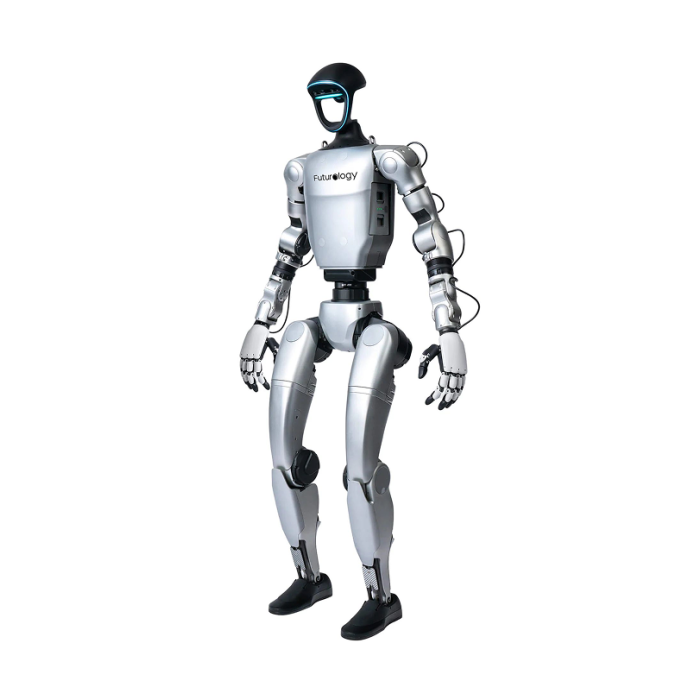
Unitree G1 Edu Pro E (U11) Humanoid Robot
In stock
- BRAND:
- UNITREE ROBOTICS
- MODEL:
- G1edu-U11
- PART #:
- G1edu-U11
- ORIGIN:
- China
- Warranty:
- 12 MONTHS
- AVAILABILITY:
- SUBJECT TO AVAILABILITY
- SKU:
- Unitree-G1edu-U11
Unitree G1 Edu Pro E (U11) Humanoid Robot
Most humanoid robots are judged by what they do on a stage. The Unitree G1 Edu Pro E (U11) Humanoid Robot is judged by what a team can make it do after the stage lights go off. It is a development platform first: open to secondary development, fitted with dual joint encoders, and supplied with a manual controller so a lab can move from first power-up to first experiment without waiting on anyone.
The product is available through this page, by quotation.
Background
Unitree and the G1 family
Unitree Robotics is a name that research labs and universities know well from legged and humanoid platforms. The G1 line is its compact humanoid family, and it comes in a ladder of versions: G1 Basic, G1 Edu Standard (U1), G1 Edu Plus (U2), G1 Edu Pro A (U9), G1 Edu Pro B (U10), G1 Edu Pro E (U11), G1 Edu Pro F (U12), G1 Edu Pro G and G1 Edu Ultimate. The lettered Pro versions sit inside the Edu range, the part of the family aimed at teaching, research and software work rather than at demonstration alone.
Anyone comparing the range can start from the Unitree G1 category, which brings the versions together on one page. Because each version carries its own figures, it pays to read the code in the product name, here U11, before comparing any two listings.
Where the Pro E (U11) sits
The Pro E belongs to the Edu series, and that series is defined by what a developer can reach. This version offers secondary development, includes a manual controller, and has dual joint encoders. Together these make a robot meant to be programmed, observed and tuned, not only operated from a remote.
The Edu series carries a depth camera and a 3D LiDAR for sensing, and Wi-Fi 6 and Bluetooth 5.2 for connectivity. For a team that builds perception, navigation or interaction software, those are the inputs and links that matter first. Related platforms for laboratory work are collected under Research Robots.
Technical Specifications
| Specification | Value |
|---|---|
| Degrees of freedom | Up to 35 DOF for the whole robot |
| Joint encoder | Dual encoder |
| Secondary development | Yes |
| Manual controller | Yes |
| Charger | 54V 5A |
| Sensors (G1 Edu series) | Depth camera + 3D LiDAR |
| Connectivity (G1 Edu series) | Wi-Fi 6 / Bluetooth 5.2 |
| Travel speed (G1 Edu series) | Up to 2 m/s |
Specifications as published by the manufacturer; confirmed against the datasheet at quotation.
The manufacturer has not published the IP rating, the operating temperature range, the maximum walking speed for this version, the weight with hands installed or the exact list of what is in the box; they are confirmed at quotation.
What does the Pro E (U11) offer a development team?
The answer begins with access. A humanoid that cannot be programmed is a display piece, and this version comes with secondary development. A team can write its own control and behavior code on top of the robot instead of living within a fixed set of motions. For a university lab or a corporate research group, this is the feature that decides whether a purchase becomes a project.
The second point is feedback. Dual joint encoders give a development team two position readings at a joint instead of one, which is useful when you study motion control, compare commanded movement with actual movement, or look for faults in a gait or an arm trajectory.
The third point is the number of joints: up to 35 degrees of freedom for the whole robot. A count at that level gives room for work on legs, arms and whole-body coordination, and it is the kind of range that lets a graduate project grow into a longer research line.
The fourth point is practical. A manual controller comes with this version, so operators can drive and test the robot directly while the software side is still being written. The 54V 5A charger helps you plan a bench or charging station before the robot arrives.
How does the Pro E (U11) compare with the other Pro versions?
The G1 range has several lettered Pro versions, and each has its own code and its own figures. None should borrow another's. If your plan calls for a neighboring configuration, look at the Unitree G1 Edu Pro A U9 Humanoid Robot, the Unitree G1 Edu Pro B U10 Humanoid Robot or the Unitree G1 Edu Pro F (U12) Humanoid Robot, and compare them line by line against the table above.
A sensible way to choose is to write down what your project truly needs: the sensing, the hands, the compute, the development access. Then ask us to match each candidate version to that list. That removes the guesswork that comes from reading similar names.
Who is the Unitree G1 Edu Pro E (U11) for?
Universities and research institutes are the clearest fit. A team that studies locomotion, manipulation or human-robot interaction needs a platform it can open up, and secondary development with dual joint encoders gives it that. Graduate students can build on the same robot that senior researchers use for their work.
Technical colleges and training centers across the Caribbean can use it to teach robotics with something students can see and touch. The manual controller makes first lessons easier, and the programming side grows with the class.
Companies exploring humanoid robots for inspection, guiding, demonstration or service tasks can use it as an evaluation platform before committing to a larger program. The depth camera and 3D LiDAR of the Edu series give a base for perception experiments.
Integrators and developers who build software for humanoids will value the open development route. Buyers who only want a robot to show at events, with no programming planned, should tell us, as the Basic version in the same family may suit that need better. Buyers who want to compare the nearby lettered versions can start from the Unitree G1 category linked earlier.
What is the Unitree G1 Edu Pro E (U11) used for?
- Locomotion research: study walking and balance with dual joint encoders giving position feedback.
- Manipulation experiments: develop arm and hand behaviors across up to 35 degrees of freedom.
- Perception and mapping: build software around the depth camera and 3D LiDAR of the Edu series.
- Teaching robotics: give students a real humanoid to program, drive with the manual controller and analyze.
- Custom software development: write your own control code through secondary development access.
- Technology evaluation: test whether a humanoid suits an inspection, guiding or service task before a wider rollout.
Pricing and Availability
We do not print prices on this page. Every Unitree G1 Edu Pro E (U11) is quoted for the configuration you need, and the quotation is the way to buy. Delivery, customs and support are arranged together with the quotation, so you see the full picture in one place. Send us your requirements, including the intended use and your location, and the Unitree G1 Edu Pro E (U11) Humanoid Robot is available on this page.
Frequently Asked Questions
Does the Pro E (U11) support custom programming?
Yes. This version comes with secondary development, so teams can write their own software on top of the robot.
How many degrees of freedom does it have?
Up to 35 DOF for the whole robot.
What sensors and connectivity does it have?
The G1 Edu series carries a depth camera and a 3D LiDAR, with Wi-Fi 6 and Bluetooth 5.2 for connectivity.
Is a controller included?
Yes, a manual controller comes with this version. The charger is rated 54V 5A.
What is the travel speed?
The G1 Edu series travels at up to 2 m/s.
Which other G1 versions can I compare it with?
The nearest lettered versions are the Pro A (U9), the Pro B (U10) and the Pro F (U12), each linked above. The Unitree G1 category lists the whole range.
Where can I buy the Unitree G1 Edu Pro E (U11) and what does it cost?
You can buy it through this page by requesting a quotation. We give no price here, because the cost depends on the configuration, delivery and support you need.
Summary
The Unitree G1 Edu Pro E (U11) Humanoid Robot matters less for what it shows than for what it lets a team build. Secondary development, dual joint encoders, up to 35 degrees of freedom and a manual controller make it a working platform for research, teaching and evaluation, with the Edu series sensing and wireless links around it. When you are ready to move from a robot you watch to a robot you program, this page is the starting point.