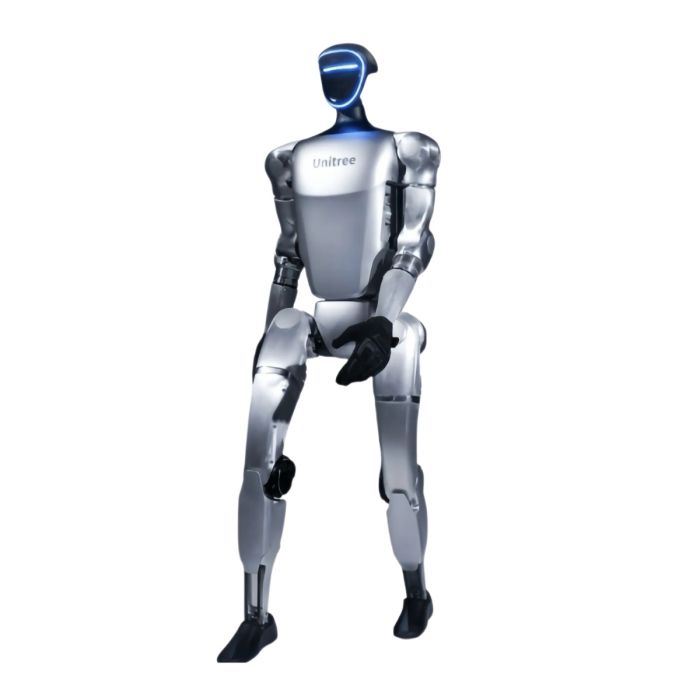
Unitree G1 Edu Pro A U9 Humanoid Robot (G1EDU-U9)
In stock
- BRAND:
- UNITREE ROBOTICS
- MODEL:
- G1 EDU PRO A
- PART #:
- G1EDU-U9
- ORIGIN:
- China
- Warranty:
- 12 MONTHS
- AVAILABILITY:
- SUBJECT TO AVAILABILITY
- SKU:
- Unitree-G1-Edu-U9
Unitree G1 Edu Pro A U9 Humanoid Robot (G1EDU-U9)
Most humanoid robots are sold on what they can show you on day one. The Unitree G1 Edu Pro A U9 Humanoid Robot (G1EDU-U9) is better judged by what it lets you do on day one hundred: swap the compute, write your own software, add touch to the hands and keep iterating. It is a platform for people who want to build on a robot, not only watch one.
The product is available through this page, by quotation.
Background
Unitree and the G1 line
Unitree Robotics is a company best known for legged robots, and over the years it has moved from walking platforms on four legs to full humanoids. The G1 is part of that progression. Within the Unitree G1 family, two versions are named in the sources: the G1 and the G1 EDU. The EDU version is the one aimed at development work, and it is the version to which every specification on this page belongs.
The G1 EDU also exists in several configurations, each sold under its own model code. This page covers the Pro A configuration, code U9. Buyers who want to compare it with the rest of the family can start from the Unitree G1 category.
Where the G1 EDU sits in a lab or a classroom
The EDU designation signals that the robot is meant to be extended. The sources list secondary development as available, a manual controller for direct operation, and a high computing power module that comes in several brands and models. Together these place the robot in the research and education tier, where the buyer decides what the machine will eventually run. Those evaluating similar machines can also browse the Research Robots category.
Technical Specifications
| Specification | Value (G1 EDU) |
|---|---|
| Model | Unitree G1 Edu Pro A U9 Humanoid Robot (G1EDU-U9) |
| High computing power module | Multiple brands and models available, such as Orin |
| Wireless connectivity | WiFi 6, Bluetooth 5.2 |
| Joint motor | Low inertia high-speed internal rotor PMSM (permanent magnet synchronous motor) |
| Joint encoder | Dual encoder |
| Secondary development | Yes |
| Dex3-1 tactile sensor option | Dex3-1 can optionally be installed with tactile sensor arrays |
| Manual controller | Yes |
Specifications as published by the manufacturer; confirmed against the datasheet at quotation.
The manufacturer has not published the IP rating, the walking speed, the onboard storage and RAM or the operating temperature range; they are confirmed at quotation.
What makes the G1 EDU different from the standard G1?
The sources name two versions, the G1 and the G1 EDU, and the specifications on this page are those of the EDU. Four of them explain why it suits development work.
The first is the high computing power module. The EDU lists it with several brands and models available, Orin among them, so the onboard computer is a choice and not a fixed part. A team that already works with a particular compute platform can say so when it asks for a quotation.
The second is secondary development, listed as available. For a research group this is the deciding line, because it means the robot is intended to run the buyer's own code, not only the behaviors it ships with.
The third is the Dex3-1 hand with its optional tactile sensor arrays. Manipulation research depends on feedback from contact, and the option allows the hands to be fitted with sensing for that purpose. It is an option, so mention it when you ask for your quotation.
The fourth is the manual controller, which gives an operator direct control of the robot during setup, demonstrations and testing.
If you want to see how other EDU configurations are arranged, the family includes the Unitree G1 Edu Pro B U10 Humanoid Robot (G1EDU-U10) and the Unitree G1 Edu Plus Humanoid Robot with Fake Hands (G1EDU-U2). Each carries its own code, and a figure given for one must not be assumed for another.
Why do the joint motor and dual encoder matter?
A humanoid is only as good as its joints. The G1 EDU uses a low inertia, high-speed internal rotor PMSM, a permanent magnet synchronous motor, as its joint motor. Low inertia is a useful property in a robot that has to change direction and absorb contact, because the motor responds quickly when the controller asks it to.
Each joint also carries a dual encoder. Two position sensing elements give the controller more to work with when it estimates where a limb actually is, which is what a developer needs when tuning balance, gait or arm trajectories. Any question about resolution or interface can be raised when you request the quotation.
Wireless connectivity is WiFi 6 and Bluetooth 5.2. In practice that means the robot can be reached over a modern wireless network for configuration and data exchange, and paired with accessories over Bluetooth.
Who is the Unitree G1 Edu Pro A U9 for?
The first group is university laboratories. A lab that wants students to write control, perception and interaction software on a real humanoid needs a robot that permits it. Secondary development and a selectable compute module speak to that need.
The second group is corporate and institutional R&D teams evaluating humanoid platforms for integration work. They benefit from a platform where the onboard computer can be matched to their software stack, and where the hands can be fitted with tactile sensing.
The third group is education providers who want a humanoid for advanced robotics courses, demonstrations and project work. The manual controller helps instructors run sessions without writing code first.
The fourth group is developers of manipulation and human-robot interaction software, for whom the Dex3-1 tactile option is the most relevant line in the table.
Buyers who already know that they need a different configuration can look at the Unitree G1 Edu Pro E (U11) Humanoid Robot as another route into the same family.
What is the Unitree G1 Edu Pro A U9 used for?
- Locomotion and balance research. Dual encoders and fast-responding joint motors give developers a solid base for gait and stability experiments.
- Custom software development. Secondary development is available, so teams can run their own control and application code.
- Manipulation and tactile studies. The Dex3-1 hand can optionally be fitted with tactile sensor arrays for contact-based work.
- AI and perception projects. A selectable high computing power module, such as Orin, lets teams match onboard processing to their models.
- Teaching and demonstrations. The manual controller lets instructors and operators drive the robot directly in class or at an event.
- Wireless integration trials. WiFi 6 and Bluetooth 5.2 support connection to lab networks and accessories during evaluation.
Pricing and Availability
The Unitree G1 Edu Pro A U9 Humanoid Robot (G1EDU-U9) is sold by quotation. Tell us which compute module you need and whether you want the tactile option on the hand, and we will prepare the quotation around your project. Delivery, customs and support are arranged with the quotation. The robot is available on this page.
Frequently Asked Questions
What is the model code of this robot?
The product is the Unitree G1 Edu Pro A U9 Humanoid Robot, with the model code G1EDU-U9. Quote that code when you ask about it so that the right configuration is quoted.
Can I run my own software on it?
Yes. Secondary development is listed as available for the G1 EDU, so the robot is intended for custom programming.
Which computing module does it use?
The high computing power module is offered in multiple brands and models, such as Orin. Tell us your preference when you request the quotation.
What wireless connections does it support?
It supports WiFi 6 and Bluetooth 5.2.
Can the hands sense touch?
The Dex3-1 hand can optionally be installed with tactile sensor arrays. Mention the option when you ask for your quotation.
Does it come with a controller?
Yes. A manual controller is listed for the G1 EDU, so an operator can drive the robot directly during setup and demonstrations.
Where can I buy the Unitree G1 Edu Pro A U9 and what does it cost?
You can request it through this page, where it is supplied by quotation. The cost depends on the configuration you choose, and the quotation sets it out for your project.
Summary
The Unitree G1 Edu Pro A U9 Humanoid Robot (G1EDU-U9) is a humanoid built to be rewritten. Its value lies in what the sources list: a selectable high computing power module, secondary development, dual joint encoders, a low inertia PMSM joint motor, WiFi 6 and Bluetooth 5.2, a manual controller and an optional tactile Dex3-1 hand. For a team that wants to keep building long after the first demonstration, this page is the starting point.
Specifications
General
Physical
Software
Shipping
Feature
| Equipped with all the functions of G1-Edu standard version |
| Upgraded from 1 to 3 degrees of freedom in the waist. |
| Single arm freedom upgraded from 5 to 7, both arms upgraded. |
| Up to 29 DOF for whole robot |